
Activate Microsoft Excel Links
Isn’t it a shame that Microsoft Excel software is “too stupid” to do this automatically?
Here are the directions…Here’s how easy it is to use…
- Highlight the column of links, or highlight just the links
- Skip columns with headers or non-linking cells
- Go to the Data Tab and press the button on the right

Without Using the Add-in?
If you prefer to download a sample sheet with the embedded macro you can see it here, and you’ll need to follow these steps:
1. Download the spreadsheet, and note the “security” warning that will appear (in Excel 2007) above column A, which simply tells you that there’s a macro in need of enabling.

2. Hit “Options” to enable the macro by choosing “Enable This Content” and checking the radio button that says “Enable macros in this document”.
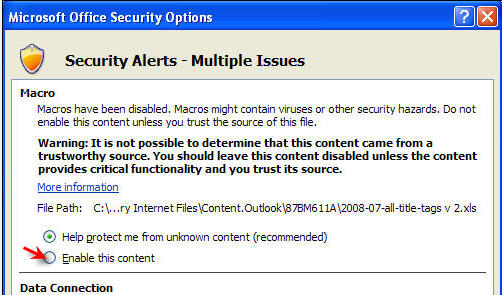
3. Import or paste your links into an empty version of the spreadsheet. Currently, in the file you download, column A is labeled for URL’s, but thats not a requirement, so feel free to change it.
4. Then all you have to do is click on the top link in the column that you wish to “activate”, and press the button to make all of your links instantly live.
Did this save you time?
Are you looking for a set of tools to manage your own website visibility? Ranking reports, competitive intelligence, on page SEO ideas, etc.?Check out SEMrush for a free trial. I’ve been a customer and affiliate of theirs for years, and use it for all clients.

Are you looking for help? Click the button below to schedule a free guest call with Scott…


Thank you thank you thank you. I’ve worked with macros before when dealing with my thousands and thousands of links, but this saved me hours!
and thank you, for “getting it” 😉 – We really need to turn it into a button or something, because so many people don’t know how to use this…
It just seems like such a simple thing to add to Excel, a lot easier than “F2 Enter” in every single cell. I had about 7,000+ links I had to use this for!
This is my current issue. However this nifty macro didn’t work to make my hundreds of email addresses go live. 🙁 I’m stuck!
you’re the first one that’s ever requested it for email addresses, but i can see how it might be useful… I’ll have to talk to the programmer…
That would be helpful.
I found an option using the following:
=”mailto:”&HYPERLINK( ) then I just copy it down.
However, it requires me to use an additional cell to activate the live hyperlink. I would much rather have the live link within the cell where the email text is. I supposed I could hide the column.
This is nice except if there is a blank cell or non-hyperlink it seems to stop making the cells after into hyperlinks?
Good point, Richard, and yet that’s true. It’s not a bug, really, just sort of a limitation (or so I’ve been told ;). I usually sort by URL column so there are no gaps, and if the sheet had headings or merged cemlls anywhere, I have to do it in segments.
Thanks for sharing this! Simple and efficient, saved me lots of time, appreciate it 🙂
Did not work for me, trying to link to a network path that contains a few thousand .pdf files. Path starts with: \\fqm.internal\Projects\PAN\…. not sure if that is where the problem is?
Sorry for the delay, but yeah, I think you’re correct, and that must be what’s wrong. I know nothing about editing macros, but i’ll run this by Karen Westerman (the Excel Queen) to get her thoughts –